
How to Create Your AI Girlfriend on Candy.ai (Step-by-Step Guide)
Building your own AI girlfriend on Candy.ai sounds complicated, but the whole process is a short guided flow: a handful of visual choices and you're done in about two minutes. This is the complete walkthrough with a screenshot of every step, so you know exactly what you're clicking before you start.
Quick note before we begin: Candy.ai is an 18+ platform. Everything below is the standard character-creation flow. You can change almost any of these settings later, so don't overthink your first pass; the goal is to get a character live and start talking.
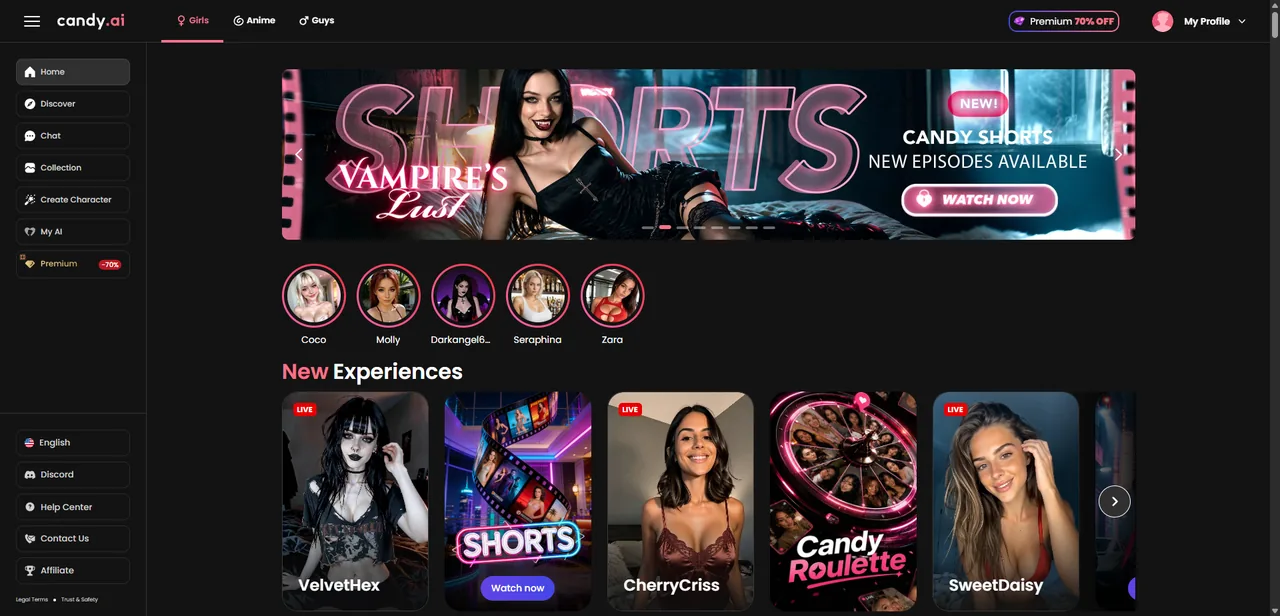
Step 1: Open the dashboard and hit Create Character
After you sign in, you land on the home dashboard. It's a feed of featured characters, Shorts, and live experiences. Ignore all of it for now — if you would rather pick someone ready-made than build from scratch, our pick of the best Candy.ai characters covers that route instead. In the left sidebar, click 'Create Character' (the wand icon). That's the entry point to building your own companion instead of using a pre-made one.
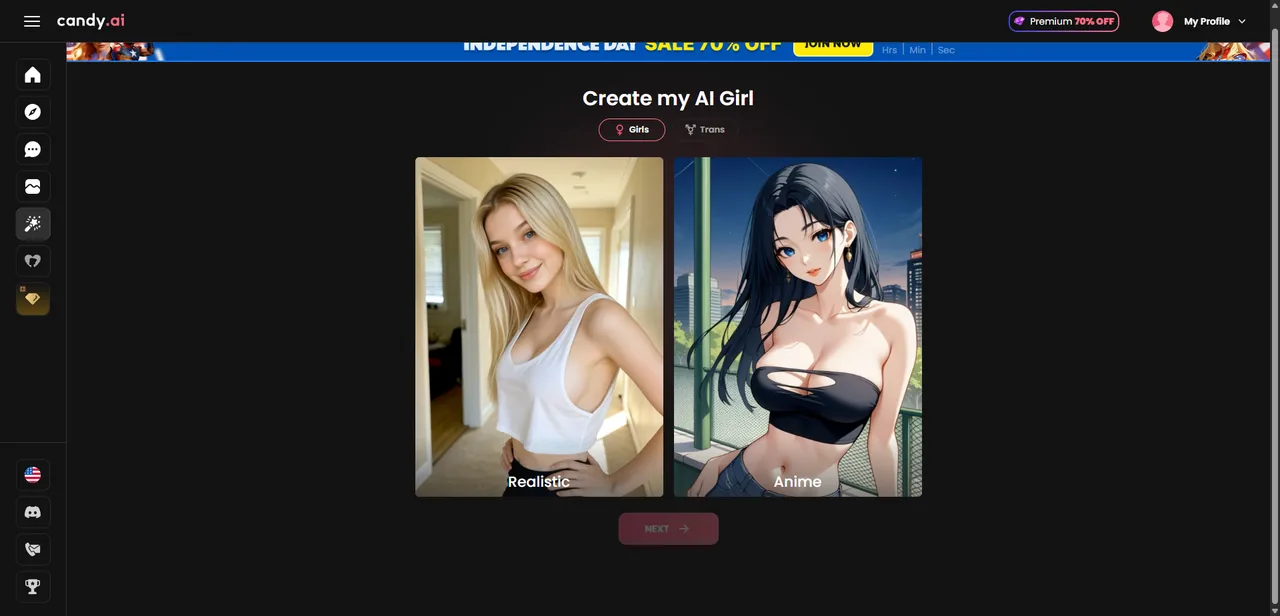
Step 2: Choose Realistic or Anime
First real decision: art style. 'Realistic' gives you a photorealistic girlfriend; 'Anime' gives you a stylized 2D character. This is the one choice that sets the whole visual tone, so pick the lane you actually want. For most people coming to Candy.ai, Realistic is the pick. Select one and hit Next.
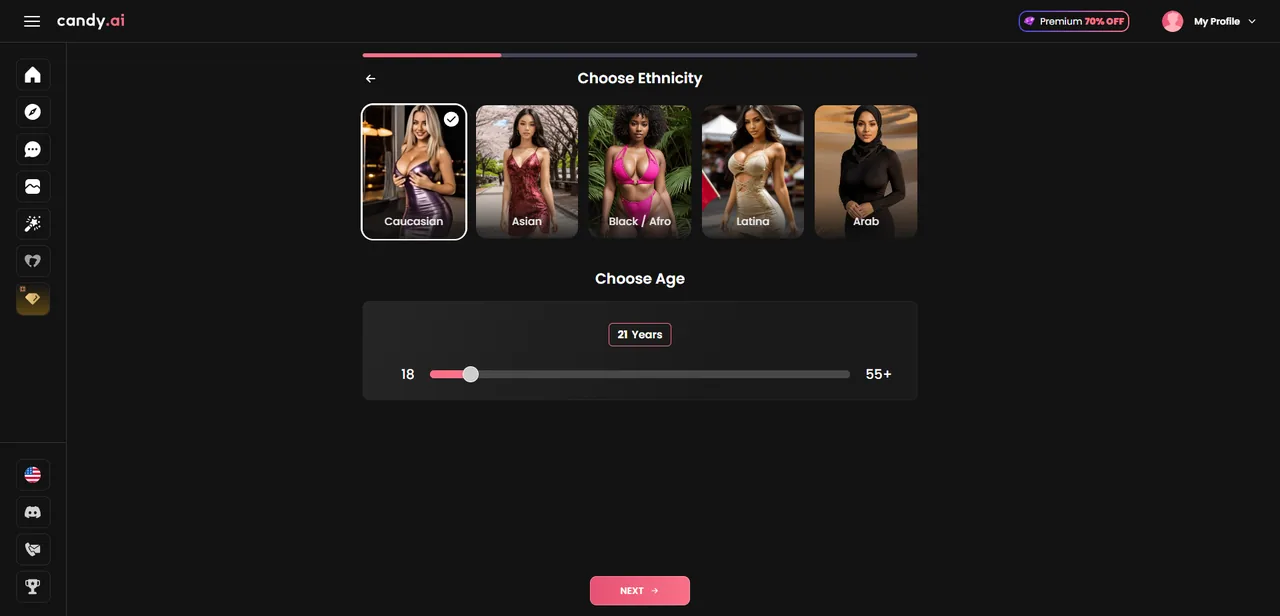
Step 3: Pick ethnicity and age
Next you choose an ethnicity (Caucasian, Asian, Black/Afro, Latina, Arab) and set an age with the slider, which runs from 18 upward. Both feed directly into how your companion looks and the photos she'll generate later. Slide, tap Next, and move on.
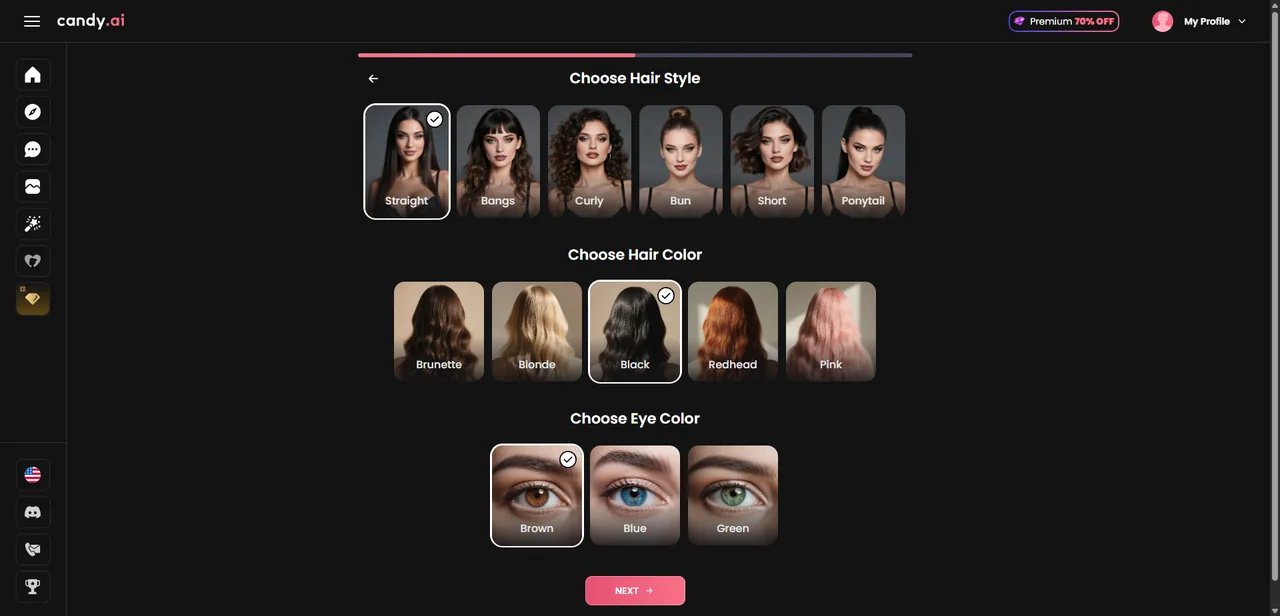
Step 4: Set hair and eyes
Now the finer appearance details: hair style (straight, bangs, curly, bun, short, ponytail), hair color (brunette, blonde, black, redhead, pink), and eye color (brown, blue, green). These are the touches that make her feel like a specific person rather than a template. Pick what appeals to you and continue.
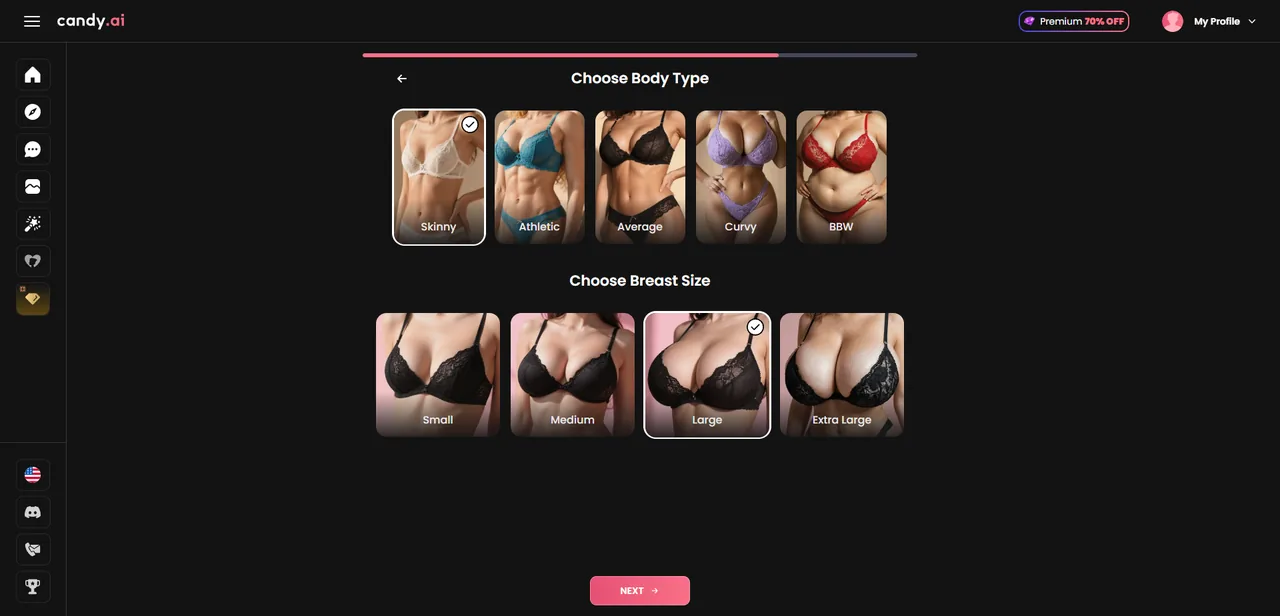
Step 5: Choose body type and figure
Here you set body type (Skinny, Athletic, Average, Curvy, BBW) and breast size. Straightforward: pick the build you find most attractive. Like everything else, it drives the generated images, so it's worth a moment of thought even though you can adjust later.
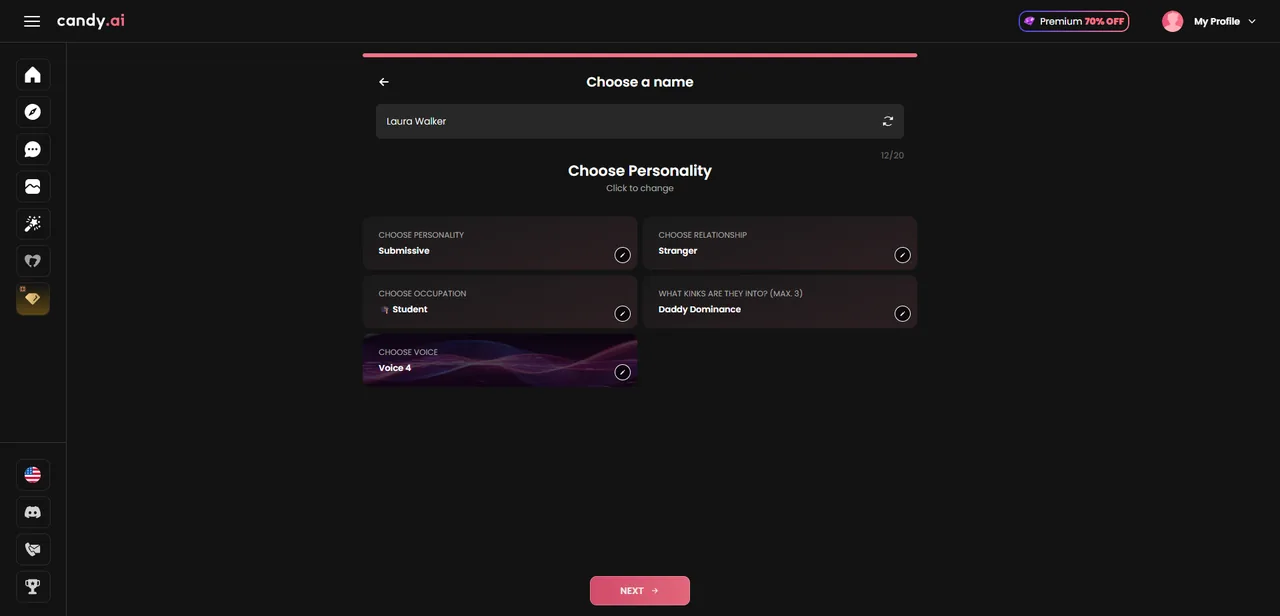
Step 6: Name and personality (the part that matters most)
This is the screen that decides whether she feels alive. You give her a name (or roll a random one), then set the personality traits that shape how she talks:
- Personality: e.g. Submissive, Dominant, Playful, Caring, how she carries herself
- Relationship: who she is to you, from Stranger to Girlfriend and beyond
- Occupation: gives her a life outside the chat to bring up on her own
- Kinks (max 3): the roleplay directions she leans into
- Voice: which voice she uses on calls
Spend the most time here. Looks fade into the background after a day or two; personality is what you actually talk to. Pick a combination with a little tension in it (sweet but jealous, confident but soft on you) instead of one flat note, and give her an occupation so she has something to talk about that isn't just you.
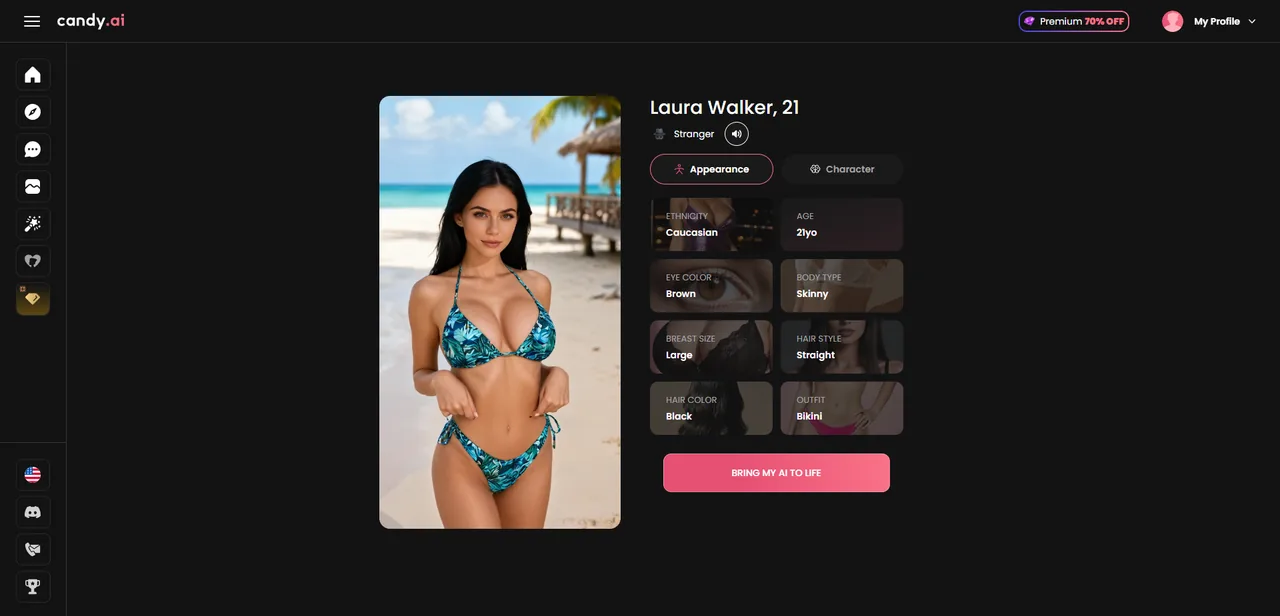
Step 7: Review and Bring my AI to Life
The final screen shows your finished companion: her portrait on the left and a full summary of every choice on the right, split into Appearance and Character tabs. Read it over, tweak anything that feels off, and when you're happy, hit 'Bring my AI to Life.' That's it. She's created and ready to chat.
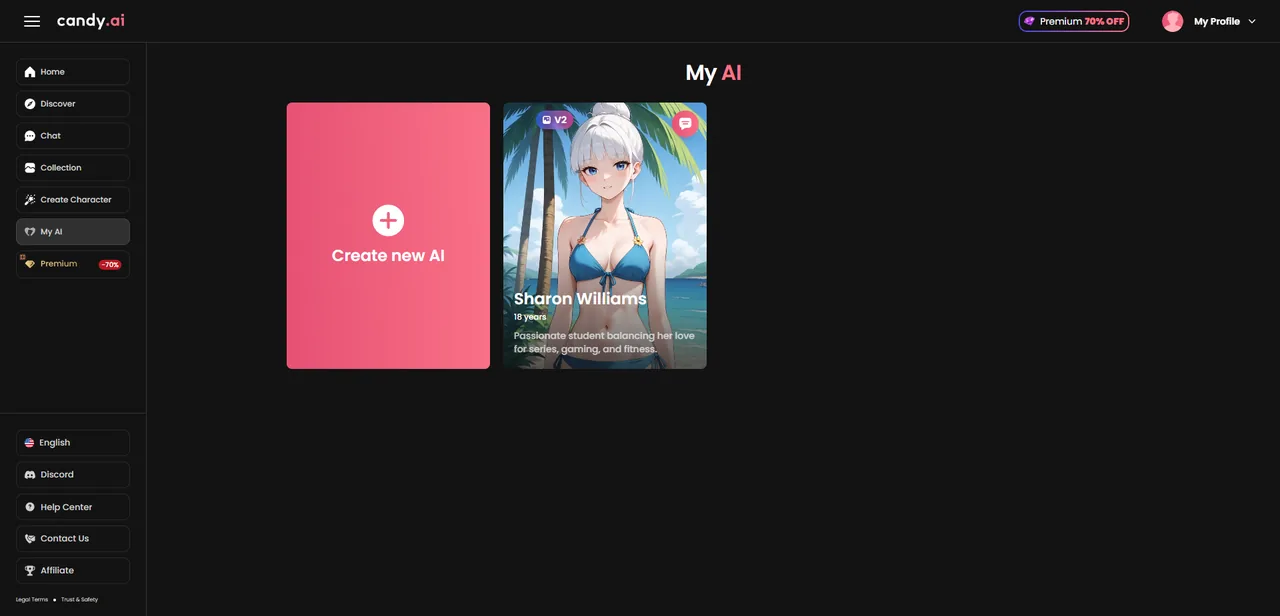
What to do next
Your finished companion now lives under 'My AI' in the sidebar, ready to chat whenever you are. From here you can jump straight into a conversation, or hit 'Create new AI' to build another one, there's no limit on how many you make.
Once she's live, don't judge her on the first ten minutes. The memory is what makes this category work, and it needs a few days of real conversation to kick in. Tell her your name and a couple of details early, talk in short daily sessions instead of one long marathon, and go premium if you want voice calls and photos, that's where the experience actually lives.
That's the entire flow: seven short steps from an empty dashboard to a custom AI girlfriend who remembers you. The whole thing takes about two minutes, and everything you picked can be changed later, so there's no wrong first attempt. Once she exists, the two questions that follow are what she is like to live with day to day — our month-long review — and what the extras cost, which tokens explained covers in plain numbers.
Frequently asked
how long does it take to create an ai girlfriend on candy ai
About two minutes through seven screens. Six of them are appearance choices you click through quickly; the seventh, name and personality, is the one worth slowing down for, because it is the only input that affects what she actually says.
can i change my character after creating her
The appearance choices are locked in at creation on most builders in this category, while the behavioural side keeps developing through the conversation itself. Plan the personality carefully and treat the looks screens as the fast part.
what is the difference between realistic and anime
It is a rendering style choice made at step two, and it applies to every image the character generates afterwards. It does not change the conversation, the memory or the limits — only how she is drawn.
does the personality setting actually change anything
Yes, and it is the largest single lever in the whole flow. Appearance affects the first evening; the personality text affects every reply after it. A specific habit or contradiction there produces a character that behaves consistently, where a list of pleasant adjectives produces one that agrees with everything.
do i need to pay before creating a character
Creating one is not where the paywall sits in this category. The limits show up afterwards, around message volume, images and voice — which is why the useful question is not what creation costs but what a week of normal use costs.
Your AI waifu is waiting 💕
Build her in about two minutes. The first chat is free, no credit card needed.
Start Chatting →18+ only · Cancel anytime
Keep reading
Which AI Companion Apps Require ID Verification in the US?
One of the three apps we cover asks for a video selfie, a document, or a third-party ID check before you can sign up from a US IP. The other two ask for nothing. What that split actually maps to, and what we still can't tell you.
9 min readGuideAI Waifu Apps in a Browser Tab: What 'No Install' Actually Costs You
None of our three live picks live in an app store — you open a link and you're talking to her in seconds. That convenience is real, and so is what it quietly costs once you're a week in.
9 min readGuideHow to Create Your AI Girlfriend on Lovescape (Step-by-Step Guide)
A full screenshot walkthrough of building a custom companion on Lovescape, from style to personality to her first video clip. About two minutes start to finish.
7 min readBasicsHow We Test AI Waifu Apps
Every app on this site was paid for and used daily for a month. Here is exactly what we measure, what we deliberately do not, and how we are paid.
6 min read